Toca Boca World Transfer Guide for Android and iPhone 2026
Are you struggling to transfer your Toca Boca World progress from one device to another? Don’t worry, this guide provides the latest 2026 updates and step-by-step instructions based on user experiences.
If you’ve unlocked characters, locations, and outfits on your old device and recently upgraded your phone, you can easily move your game progress by following this guide.
This guide is both for Android and iPhone users. So, continue reading to learn the complete process.
Reasons to Transfer Your Toca Boca Game Progress
Transferring your game performance is not compulsory, it’s entirely up to you. If you are a new player with no prior progress then you don’t need to transfer your performance but if you have been playing this game for a while then you should transfer your progress. Here are the main reasons:
Transferring your progress ensures that your dedication, purchases, and achievements are not wasted when switching devices.
What Transfers in Toca Boca World and What You’ll Lose
There are some limitations in the process of transferring the game progress. You cannot transfer all your game progress. Here’s what can and cannot be transferred.
What You Can Transfer
These items can be transferred to your new device:
What You Can’t Transfer
These items cannot be transferred to a new device.
Prerequisites for Smooth Performance Transfer
Follow these steps before transferring Toca Boca performance:
How To Transfer And Restore Toca Boca World On Android
When you switch to a new Android device and want to continue playing Toca Boca World with your previous progress, follow these steps. Your data is stored in your Google Account.
Download Toca Boca World from the Google Play Store using the same Google Account you used for your previous purchases.
By using a new Google Account, you cannot restore your data. Remember, also you cannot restore data from other stores like the App store to Android. Use the same account with the same store to successfully restore the backup.
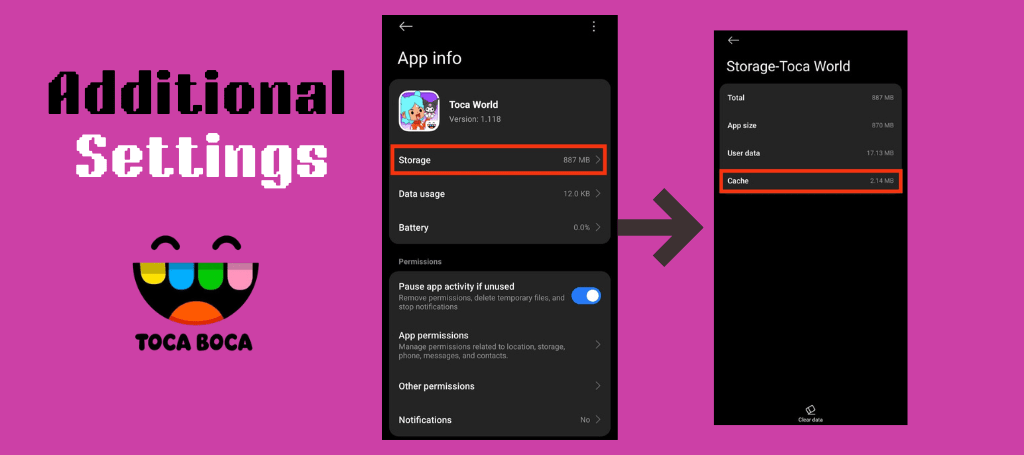
If your purchases don’t appear after restoring, ensure that:
If the issue persists, try the following steps:
After restarting, your purchases and progress should appear correctly.
How To Transfer And Restore Toca Boca World On iPhone
Bought a new iPhone and want to keep your previous game performance to your new device? Transferring and restoring your game progress on the iPhone is simple and works similarly to Android. You can easily transfer your data from old to new iPhone.
Make sure you are using the same Apple ID on your new iPhone that was previously used for purchasing. Keep in mind that progress cannot be transferred across platforms, such as from Android to iPhone.
If you face any issues, follow the above-mentioned troubleshooting steps. Once done, you’ll regain access to all your previously unlocked locations, characters, and accessories.
Common Toca Boca Issues and Their Fixes
Sometimes, after restoring purchases or backups, your purchased packs or homes may still fail to appear in the game. In addition, some players have reported that their entire world resets after certain updates or unexpected crashes. One user even shared, “Every single new update totally resets my game when I log on,” highlighting how common this issue can be. If this happens:
Note: Toca Boca does not offer any official cross-platform transfer support. This means you cannot move your world or purchases between Android and iOS devices.
Conclusion
In this era, it is very easy to transfer Toca Boca World progress data from one device to another. You can transfer your data on Android devices through Google backups and iCloud is used to transfer data for iPhones. However, remember that cross-platform transfers (Android to iPhone or vice versa) are not supported.
Before starting, always make sure your app is updated, your internet connection is stable, and you’re signed in with the same Google or Apple account used for previous purchases. These small steps can prevent major data loss.
By following the instructions in this guide, you can continue enjoying your Toca Boca World adventure without losing your hard-earned progress, purchases, or creations.